Claude Cowork Global Instructions: Teach It Your Business Once
Every new Cowork task starts from zero unless you've told Claude who you are and how you work, somewhere it will actually remember. Global instructions are that somewhere. Here's what they do, how they differ from memory, and what to put in yours.
 By Abi Odedeyi · CodeFreeIQ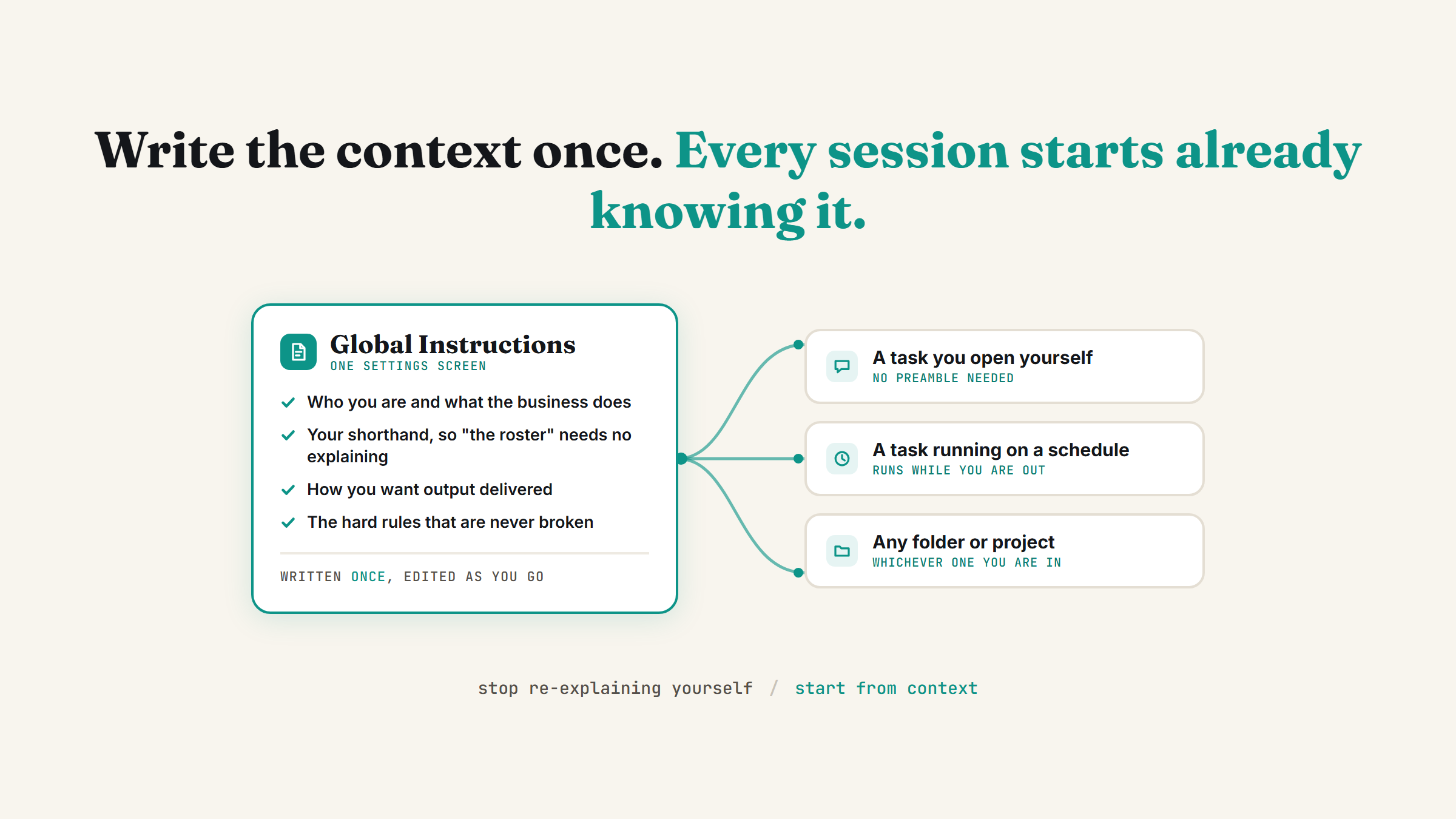
If you've ever opened a new Cowork task and typed out your role, your business, and how you like things formatted before you could even get to the actual request, you've been doing manually what one settings screen does automatically. Global instructions are a block of standing context you write once, and Claude reads it at the start of every Cowork session from then on. Here's exactly what that setting does and what's worth putting in yours.
What global instructions actually are
Global instructions are a standing brief, not a one-off prompt. You write it once in Settings, and Claude references it at the start of every Cowork session you run afterwards, whether that's a task you open yourself or one running on a schedule, regardless of which folder or project you're working in. It's the answer to "why do I keep typing the same three sentences of context at the top of every task."
Worth knowing before you go looking for it, because there are currently two places it can live depending on how far your account has moved through Anthropic's rollout:
- Settings > Cowork, with an Edit button next to Global instructions. This is the original home, and in this form the block applies to every Cowork session.
- Settings > General, where it has been folded into a single field called "Instructions for Claude." This is the newer unified setting, rolling out across Pro and Max plans, and in this form the block applies to every conversation rather than just Cowork ones.
If the first path doesn't match what you see, check the second. Anthropic's own guidance when your account makes that switch is worth repeating: go and read what's in the field, because your Cowork block becomes the instruction set for all your chats too, and a line you wrote with only Cowork tasks in mind may read oddly once it applies everywhere.
What to actually put in yours
Global instructions are for context that's true every time, not context that changes by task. Worth including:
- Who you are and what your business does, in a couple of plain sentences, the same way you'd introduce yourself to a new hire on day one.
- The shorthand and acronyms you actually use, so Claude doesn't have to ask what "the Q3 deck" or "the Tuesday report" means every time you mention it.
- How you like output delivered: format, length, tone, whether you want bullet points or prose, British or American spelling.
- Hard rules that should never be broken, like "never delete a file without asking first" or "never send an email without showing me the draft."
What doesn't belong here: anything that changes week to week, like this month's priorities or an active client's specific status. That kind of context is better handled by memory, which updates itself as your conversations move on, rather than a fixed block you'd have to keep editing by hand.
How this is different from memory and from a Project
It's easy to blur these together because they solve a similar-sounding problem, so it's worth being precise. Global instructions are context you write explicitly, and they apply to every Cowork session no matter which folder you're in. Memory is context Claude infers and updates automatically from your actual conversations, and it's scoped separately per Project rather than applying globally. And a Project's own instructions sit narrower still: context specific to one piece of work, not your whole business.
Put plainly: global instructions are the constant, memory is the thing that keeps itself current, and Project-level context is the exception for one specific folder. None of them replace the other two.
Treat it as a living block, not a one-time exercise
The habit that makes this setting worth having is small: the moment you catch yourself typing the same piece of context for the second or third time, stop and go add it as a line. Open the setting, paste in "always flag any figure over £500 for my review," save, and you never type it again.
Most people write their global instructions once, on the day they discover the setting, and never open it again. That's the version that goes stale. The useful version grows by a line or two a week for the first month as you notice your own repetitions, then settles down.
A worked example
Take a fictional small agency, Marlow & Finch, a two-person marketing shop. Their global instructions run about six lines: who they are and who their clients tend to be, the fact that "the roster" means their current client list, that deliverables should come back as a short summary first with detail underneath, and one hard rule: never contact a client directly, always route drafts back to a human first. Every task either of them opens in Cowork, whether it's a one-off request or something running on a schedule, starts already knowing that, instead of one of them re-typing it before the actual request.
Once your global instructions are actually written and worth trusting, the natural next step is checking the rest of the nine settings that turn Claude into your team are switched on too. Book a strategy call if you'd rather have someone sit down and write the real block with you than guess at it alone.
FAQ
What are global instructions in Claude Cowork?
A block of standing context you write once in Settings, covering who you are, your business, your preferred output style, and any hard rules. Claude reads it at the start of every Cowork session from then on, whether you opened the task yourself or it ran on a schedule, without you re-explaining it each time.
How are global instructions different from memory?
Global instructions are context you write explicitly and edit yourself. Memory is context Claude infers and updates automatically from your actual conversations, and it's scoped per Project rather than applied everywhere. Use global instructions for facts that stay true (your role, your jargon, your hard rules) and let memory handle whatever naturally shifts as you talk to it.
Where do I find the global instructions setting?
One of two places, depending on how far your account has moved through Anthropic's rollout. Originally it sits at Settings > Cowork, with an Edit button next to Global instructions. In the newer unified setup it has been folded into a single "Instructions for Claude" field at Settings > General. Check the first path, and if it isn't there, check the second.
Do global instructions apply outside Cowork, like in regular Claude Chat?
In the original Cowork-only form, no: the block applies to your Cowork sessions. In the newer unified form, where it lives as "Instructions for Claude" under Settings > General, yes, it applies to every conversation including ordinary chats. If your account has made that switch, it's worth re-reading what's in the field, because anything you wrote for Cowork tasks now shapes your chats as well.
Want your global instructions written properly, not guessed at?
Book a strategy call and I'll help you write the actual block of standing context Claude should carry into every task, based on how your business really runs.
Book a strategy call →One working AI system in your inbox, weekly
The Operator's AI: the email edition of everything I publish here, plus the Free AI Bundle the moment you join.
Subscribe free →