Control Your Computer From Your Phone: Remote AI Builds
You don't have to sit at your desk waiting for Claude to finish something. Two features, Dispatch and Remote Control, let you send work off from your phone or check in on it from the couch. Here's exactly what each one does, and which one you actually need.
 By Abi Odedeyi · CodeFreeIQ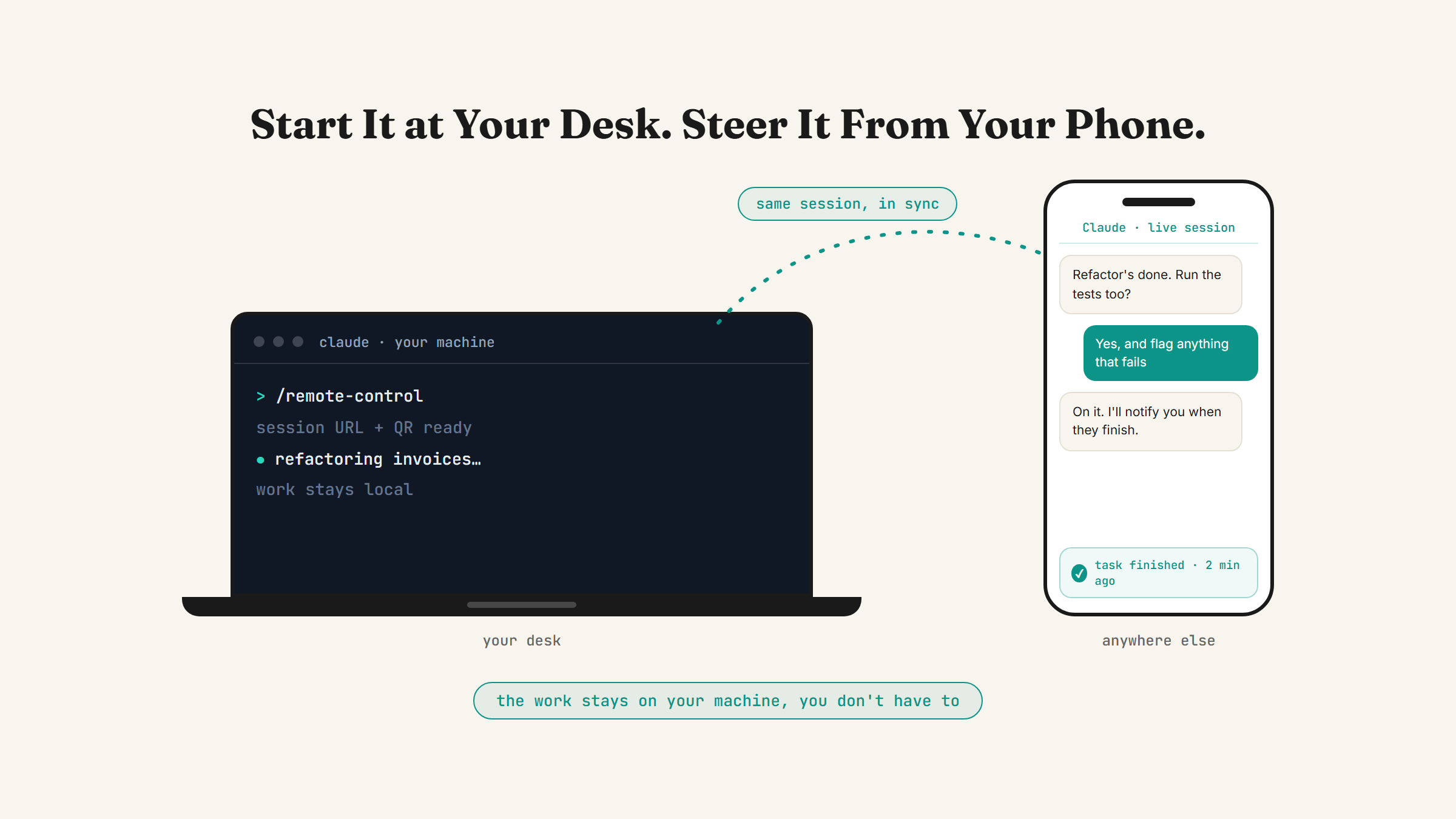
You start a task in Claude, then you have to leave your desk: a meeting, the school run, lunch. Until recently that meant either sitting there waiting for it to finish or coming back later with no idea what happened while you were gone. Two different features fix that now, and they solve different moments, so using the wrong one for the job feels clunky. Here's exactly what each one does.
Two ways to do this, and they're not the same thing
Dispatch lives in the Cowork tab of Claude Desktop. You message it a task from your phone, and it decides how to handle it, running the whole thing without you touching your laptop at all.
Remote Control is different: it lets you check in on and steer a Claude Code session that's already running on your machine, from your phone or a browser, while the actual work still happens locally. One starts something new from your phone. The other lets you keep an eye on something already in progress. Both matter, and most people only need one of them most of the time.
Dispatch: message Claude a task from your phone
Dispatch is a standing conversation with Claude that lives inside Cowork. Once your phone is paired with Claude Desktop, you can message Dispatch a task the same way you'd text a colleague, and it works out where that task belongs. Research, document editing and spreadsheet work stay in Cowork. Anything that looks like development work, fixing a bug, updating a dependency, running tests, opening a pull request, gets spun up as a Claude Code session automatically, or you can ask for one directly: "open a Claude Code session and fix the checkout bug."
You get a push notification on your phone when the task finishes or when it needs your approval on something. That's the whole point: you fire it off, put your phone away, and get pinged when there's actually something to look at.
One thing worth knowing before you set it up: Dispatch requires a Pro or Max plan. It isn't available on Team or Enterprise plans.
Remote Control: steer a session that's already running
Remote Control is a different feature, built for Claude Code, the more hands-on, builder-level version of Claude. It connects claude.ai/code or the Claude mobile app to a Claude Code session already running on your computer. The work itself, reading and changing files, running commands, still happens on your machine. Your phone or browser is just a live window into that session, showing you the same conversation your terminal or editor shows, in sync in both directions.
To start one, type /remote-control (or the shorter /rc) inside a Claude Code session, or launch a new session with it already switched on using claude --remote-control in your terminal. Either way, you get a session URL and a QR code. Scan the code with the Claude mobile app, open the URL in any browser, or just find the session by name in your session list on claude.ai or in the app.
Once connected, you can type from your terminal, reply from your phone, and both stay in sync. Claude can also send you a push notification when a long task finishes or when it needs a decision from you, if you switch that on inside /config. Remote Control is available on Pro, Max, Team and Enterprise plans (on Team and Enterprise an admin has to switch it on first), but not on API key setups.
What to know before you rely on it
Neither of these is "Claude runs entirely in the cloud with nothing on your end." That's a separate thing, Claude Code on the web, which runs sessions on Anthropic's own infrastructure instead of your machine. Dispatch and Remote Control both still need your computer doing the actual work, so a couple of practical limits follow from that:
- Remote Control needs the local session to keep running. Close the terminal or quit the app, and the connection drops until you bring the session back.
- A long network outage is survivable, mostly. A normal interactive session keeps retrying and reconnects on its own when your internet comes back. The dedicated server mode (
claude remote-control, run without a session of its own) gives up after roughly ten minutes offline, and you'd start a new one. - Dispatch needs pairing done once, up front, from inside Claude Desktop, before you can message it from your phone.
None of this makes either feature fragile day to day, it's just worth knowing before you're relying on it for something time-sensitive.
Which one should you actually use
If you live in Cowork and rarely open Claude Code directly, start with Dispatch. It's the lower-setup option, and the push notification alone saves you from checking back every ten minutes. If you're already comfortable in Code and tend to kick off longer builds, Remote Control lets you keep steering that specific session instead of firing it off and hoping for the best.
Both fit naturally next to scheduled tasks in Cowork, which handle the fully hands-off, recurring end of the same idea: things Claude runs on its own schedule with no message from you at all. Dispatch and Remote Control are for the in-between, work you're actively directing but don't want to sit and watch.
FAQ
What's the difference between Dispatch and Remote Control?
Dispatch starts new work from your phone: you message it a task and it decides where that task should run, inside Cowork or as a new Claude Code session. Remote Control connects your phone or browser to a Claude Code session that's already running on your computer, so you can watch and steer it as it works, rather than starting something fresh.
Do I need a paid Claude plan to use these?
Yes to both. Dispatch requires a Pro or Max plan and isn't available on Team or Enterprise. Remote Control is available on Pro, Max, Team and Enterprise plans, but not on setups that use an API key instead of a claude.ai account.
Does my computer need to stay on for this to work?
Yes, for both. The actual work happens on your machine, your phone or browser is a window into it. For Remote Control specifically, closing the terminal or the app ends the connection until you bring the session back. A normal interactive session rides out network drops and reconnects on its own; only the dedicated server mode times out, after roughly ten minutes offline.
Is this the same as running Claude fully in the cloud?
No. That's Claude Code on the web, a separate feature that runs sessions on Anthropic's own servers instead of your computer. Dispatch and Remote Control both still rely on your machine doing the work, your phone just lets you start or check in on it remotely.
Once you've got one of these set up, it's worth revisiting the nine settings that turn Claude into your team to check the rest of your setup matches how you actually work, not just what was on by default.
Want your phone set up to steer Claude properly?
Book a strategy call and I'll walk through pairing your phone with Claude Desktop and setting up Remote Control live, so you're not guessing which one fits your work.
Book a strategy call →One working AI system in your inbox, weekly
The Operator's AI: the email edition of everything I publish here, plus the Free AI Bundle the moment you join.
Subscribe free →