Using Claude for Business Analysis: What It Does With Your Numbers, and Where You Still Check
Paste in a messy spreadsheet and Claude will hand you back a clean, readable summary of what's going on in your numbers, fast. The part nobody tells you is that it can sound exactly as confident when it's wrong as when it's right. Here's what it's actually good for, and the check that catches the difference.
 By Abi Odedeyi · CodeFreeIQ
Drop a real spreadsheet into Claude and ask what's going on with it, and you'll get something back that reads like a competent analyst wrote it: the trend, the outlier, a plain-English take on what it means. That part works, and it works fast. What's easy to miss is that Claude writes that summary with the same even, confident tone whether it read your numbers correctly or whether it quietly misread a column header three rows up. The analysis itself isn't the risky part. Trusting it without a check is.
What it's actually good at
Claude can read an uploaded spreadsheet or CSV directly and work with the data in it, not just describe what a spreadsheet generally contains. Hand it a real file (sales by month, a pipeline export, an expense breakdown) and ask a specific question, and it will pull out the relevant rows, summarise the pattern, and explain it in language you'd actually say out loud to a client, rather than a wall of pivot-table jargon.
It's genuinely strong at three things:
- First-pass summarising. Turning 400 rows into "revenue is up but almost entirely from one client" in a few sentences.
- Spotting what's unusual. Flagging the one month that doesn't match the pattern, or the line item that jumped for no obvious reason, so you know where to look closer.
- Writing the commentary. Once you've confirmed the numbers are right, it's fast at turning them into the paragraph you'd actually put in a client update or a board note.
Where it quietly gets things wrong
The failure mode to watch for isn't a crash or an obvious error message, it's a confident wrong answer that reads exactly like a confident right one. With code execution switched on (it is on by default, under Settings > Capabilities), Claude works the numbers out by writing and running code on your file, so the arithmetic itself is rarely where things go wrong. The risk is in what it decides to calculate. On a short, clean dataset that rarely shows. On a longer or messier one, a column header can get misread, two similarly named categories can get merged, or a filter can quietly drop the rows you cared about, and nothing about the tone of the answer tells you it happened. Anthropic's own help pages say as much: you may need to review Claude's outputs, and it is worth keeping an eye on what it does while it works.
This matters more the further the output travels. A directional read for your own planning is low stakes. A number that ends up in a client report, a board deck, or a pricing decision is not, and that's exactly the point where "it sounded right" stops being good enough.
The two-minute check that catches it
You don't need to re-do the analysis by hand to trust it. Three habits catch nearly everything:
Ask it to show the working, not just the answer. "Which rows did you use for that total?" turns an opaque number into something you can actually check. If it can't point to specific rows, treat the number as a draft, not a fact.
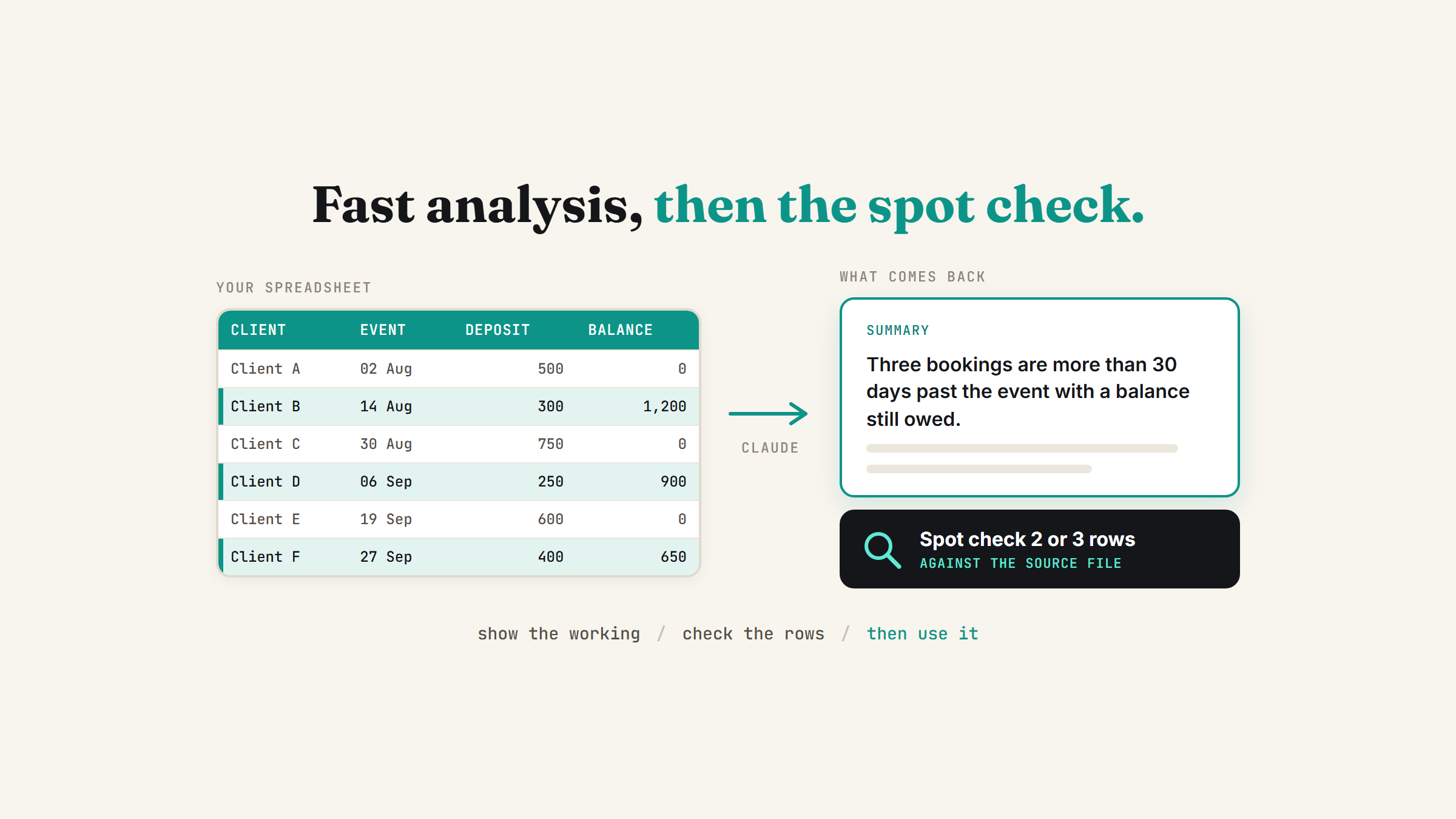
Spot-check two or three rows yourself. Pick one you can verify in seconds and compare it to the source file. If that one's right, your confidence in the rest goes up a lot. If it's wrong, stop and find out why before you use any of it.
Ask the same question a second way. Rephrase the request or ask it to re-total a different slice of the same data. A consistent answer both times is reassuring. A different one tells you something was unstable the first time, and you'd rather find that out now than after it's in front of a client.
A quick example
Here's how it plays out, using an illustrative example. Say a small events-hire business runs its bookings pipeline as a spreadsheet: client, event date, deposit paid, balance due. Before a quarterly review, the owner uploads an anonymised version (names stripped, as in using AI on client work without leaking data) and asks Claude to flag any bookings with an outstanding balance more than 30 days past the event date. Claude returns a short list with amounts. The owner checks two of those against the original file before the meeting, both match, and the list goes into the review as a genuine finding rather than a guess.
Turning a one-off check into something repeatable
If you're running the same kind of analysis on your numbers every week or every month, a one-off chat is the slow way to do it. The same logic that reads a spreadsheet once can sit inside a small Artifact-built tool that does the same check every time you drop in a new export, or a recurring scheduled check like the one behind a free AI time audit. Either way, the check from the section above still applies: verify the first few runs closely, then spot-check occasionally once you've seen it hold up.
FAQ
Can I trust Claude with my actual financial numbers?
For reading and summarising, yes, with the spot-check habit above applied before anything leaves your own desk. For generating or forecasting numbers you don't already have, no: Claude doesn't know your real costs, market, or future revenue, so any projected figure should come from you, not from it filling a gap convincingly.
What file types can Claude actually read?
Anthropic's upload guide lists CSV, XLSX, PDF, DOCX and plain text among the supported document types. Excel files need one setting first: code execution and file creation has to be switched on in Settings > Capabilities (it is on by default). With that on, Claude works with the real data inside the file rather than a general description of what that kind of file usually contains.
Is it safe to upload a client's spreadsheet?
Strip identifying details first, client names, company names, anything personally identifying, the same way you would before pasting a draft into a prompt. See using AI on client work without leaking data for the full check before anything client-related goes anywhere near a prompt.
How do I know if an answer is wrong without redoing the whole analysis myself?
Ask it to show which rows or figures it used, then verify two or three of those yourself against the source file. If those check out, you can use the rest with far more confidence. If they don't, stop and find out why before the number goes anywhere else.
Want a second pair of eyes on your own numbers?
Book a strategy call and bring a real spreadsheet. We'll run it through Claude together and I'll show you exactly where to check its work.
Book a strategy call →One working AI system in your inbox, weekly
The Operator's AI: the email edition of everything I publish here, plus the Free AI Bundle the moment you join.
Subscribe free →