The Best AI for Consulting Research (the Stack I Use, and Where It Gets Things Wrong)
People ask me for "the best AI for consulting research" like there's a single answer. There isn't. There are two tools that do different jobs, and one habit that catches what both of them still get wrong.
 By Abi Odedeyi · CodeFreeIQ
"What's the best AI for consulting research?" comes up a lot after training sessions, and it's the wrong question. It assumes one tool should do the whole job. In practice I run two tools for two different parts of research, and neither one is trustworthy enough to skip the third step: checking its work before it reaches a client.
The job isn't one job
Consulting research is actually three separate tasks wearing one name. There's reading a pile of material and finding the patterns in it. There's turning those patterns into a first draft a human can edit. And there's answering a specific question against a fixed set of documents, where the answer has to be traceable back to an exact source. Treating all three as "AI research" is how people end up disappointed with a tool that was never built for the job they gave it.
What I actually use, and for what
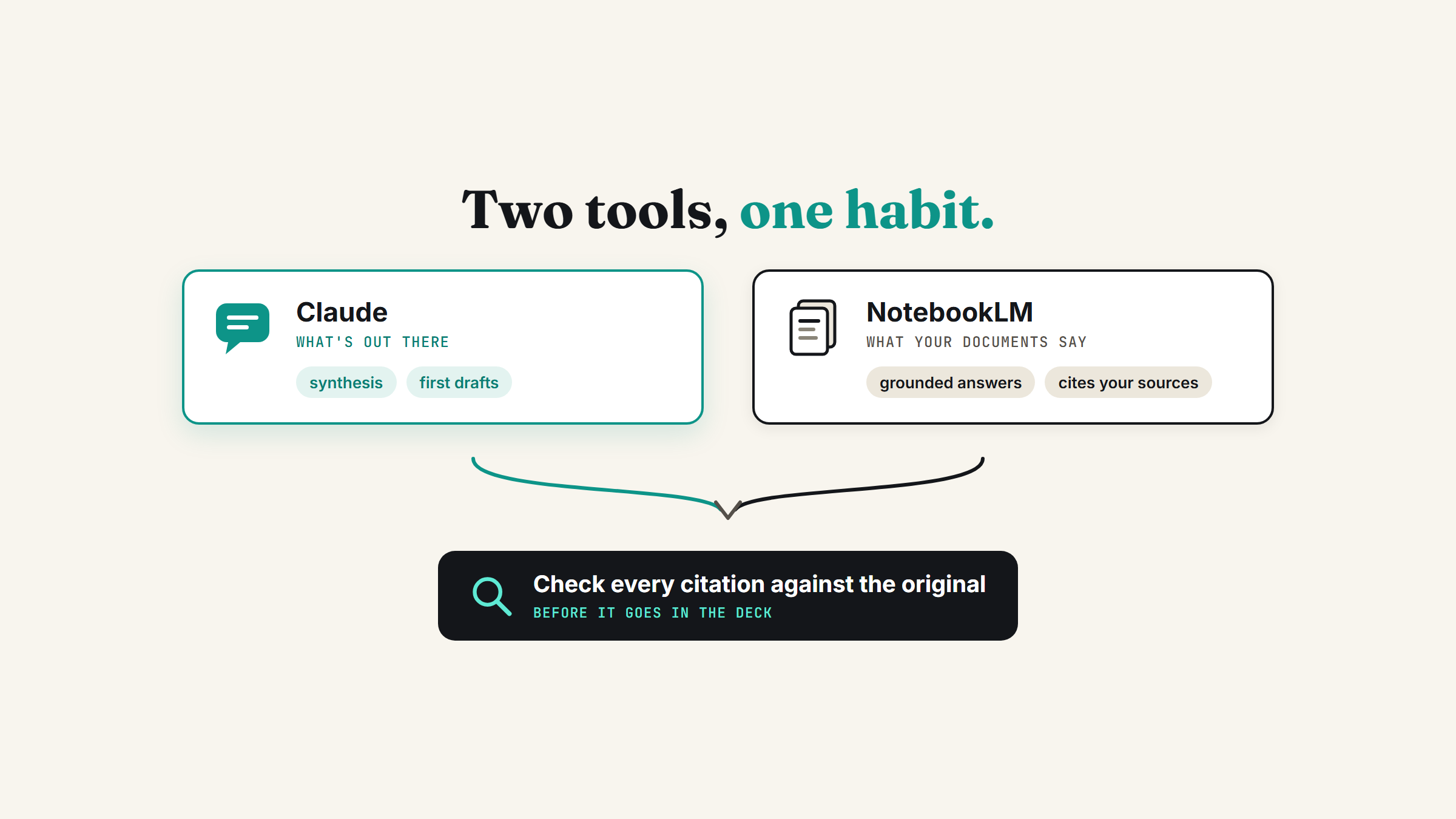
Claude handles synthesis and first drafts. Feed it a pile of interview notes, a competitor teardown, or a stack of reports, and ask for the patterns or a first-pass structure. It's fast at this because it isn't tired on page forty, and when its web search is switched on it returns inline citations you can click through to the actual source. That's genuinely useful for broad research: scanning what's publicly out there on a market or a competitor before you narrow in.
NotebookLM handles grounded, document-specific answers. This is the tool for when you've already gathered the material (a client's financials, a stack of board minutes, last quarter's reports) and need answers that come only from those documents, not from a general guess. Upload the set as sources and every answer it gives cites the exact passage it came from. If the answer isn't in what you uploaded, it's built to tell you so rather than fill the gap with a general guess. I've written a full walkthrough of how it works and there's a setup guide if you want to try it on your own material.
The split in one line: Claude for "what's out there," NotebookLM for "what does this specific pile of documents actually say."
Where Claude gets it wrong
Broad synthesis is also where it's easiest to sound confident and be wrong. Ask Claude to summarise a market with ten sources open and it can blend details across sources in a way that reads smoothly but quietly misattributes a stat to the wrong report, or smooths over a disagreement between two sources instead of flagging it. The citations help, because you can click through, but only if you actually click through instead of trusting the summary on sight.
Where NotebookLM gets it wrong
Grounding to your documents doesn't mean the documents agree with each other. If two reports in your source set contradict each other, NotebookLM will still answer, and it may pick one source over the other without making that choice obvious unless you ask it directly which source it used. It also only knows what you uploaded. Ask it something outside the documents and a good version of the tool says so, but it's still worth checking that it actually did, rather than assuming.
The habit that catches both
Take a fictional example: a one-person strategy practice I'll call Birchcombe Advisory, no research staff, three live engagements at a time. Before a market scan goes anywhere near a client deck, the rule is simple: every number and every named source gets checked against the original, not against the AI's summary of it. That's maybe fifteen minutes for a ten-page scan. It has caught a misattributed statistic twice this year, once in each tool. Fifteen minutes is cheap insurance against putting a wrong number in front of a client in your own name.
If you're working this stack against real client material, strip anything client-identifiable before it goes into either tool, and if you want the fuller picture on which parts of consulting work are safe to hand off at all, that's the question I answer here.
What this actually buys you
The time saved isn't in skipping the checking step, it's in getting to a checkable first draft faster. A market scan that used to eat a full day now takes an afternoon: AI does the first pass, you spend the time you got back verifying the parts that matter and talking to the client instead of reading cold. That's the same trade I've written about for consulting work generally: the mechanical part of the job gets faster, the judgement part stays exactly as slow and exactly as valuable.
FAQ
What's the best AI for consulting research?
There isn't a single best one, because research isn't a single task. Claude is the stronger fit for broad synthesis and first drafts across a pile of material, with citations you can click through. NotebookLM is the stronger fit for grounded, document-specific answers where you need every claim traceable to an exact source you uploaded. Most consulting research needs both at different stages.
Can I trust the citations AI research tools give me?
Trust them enough to click through, not enough to skip clicking through. Both Claude's web citations and NotebookLM's source citations point you to a real passage, which is genuinely useful, but neither guarantees the summary around that citation is accurate. The citation tells you where to check, it doesn't do the checking for you.
Is NotebookLM better than Claude for research, or the other way round?
Neither, they're built for different inputs. NotebookLM only answers from documents you deliberately upload into that notebook, which makes it stronger when you need an answer grounded in a fixed set of material. Claude can search broadly and synthesise across open-ended sources, which makes it stronger for exploratory research before you've narrowed down to a specific document set.
How much time should I actually spend checking AI research before using it with a client?
Enough to verify every number and every named source against the original material, not against the AI's summary of it. For a typical scan that's a fraction of the time the research itself would have taken by hand, and it's the step that keeps a wrong figure from ever reaching a client deck under your name.
Want help building your own research stack?
Book a strategy call and I'll help you work out which research tasks are safe to hand off, which tool fits each one, and the checking habit that keeps your name on the work.
Book a strategy call →One working AI system in your inbox, weekly
The Operator's AI: the email edition of everything I publish here, plus the Free AI Bundle the moment you join.
Subscribe free →