Can Claude Cowork Edit Google Docs? What Anthropic Actually Documents
A new add-on and a new connector both let Claude change a real Google Doc in place now, no more copy, rewrite, paste back. What neither one is documented to do is run inside Cowork itself. Here's the picture Anthropic's own pages actually support, and what that gap means if you're working from Cowork.
 By Abi Odedeyi · CodeFreeIQ
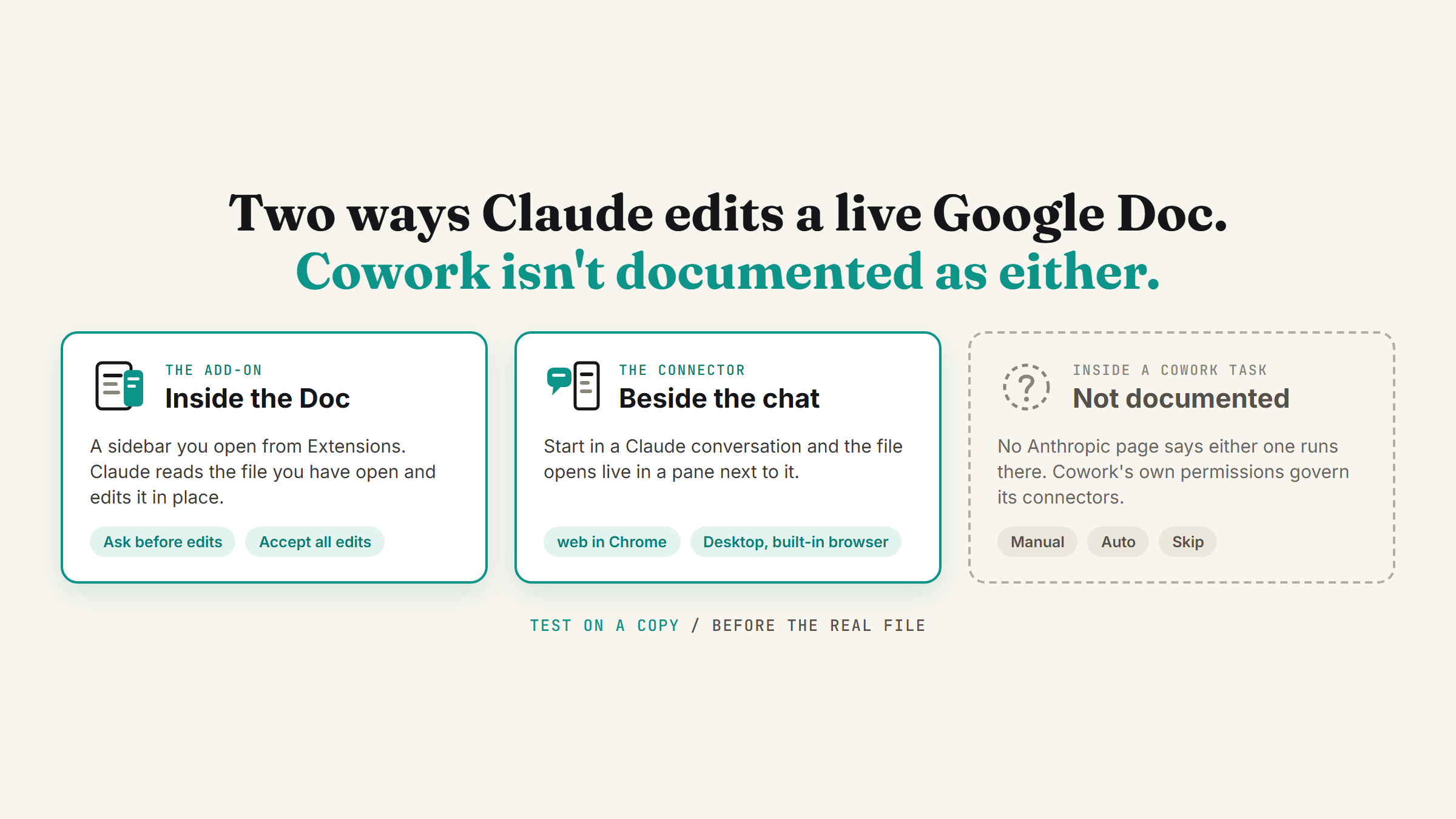
Here's the honest short answer. Claude can now edit an existing Google Doc in place, through two separate features Anthropic has added. Neither of them is documented as running inside a Cowork task. If you came here specifically asking whether Cowork can do this, the answer on paper right now is: not confirmed either way, and here's exactly what is.
The two things that actually edit a live Doc
These are two different products, and most of the confusion comes from treating them as one thing.
The add-on is a sidebar that lives inside the Google Doc, Sheet, or Slide deck itself. You install it from the Google Workspace Marketplace, open "Extensions > Claude > Open Claude" inside the file, and Claude reads whatever's open and your current selection, then edits it directly. It runs in Chrome, Edge, or Safari (Firefox isn't supported in this beta).
The connector works the other way round: starting from a Claude conversation rather than from inside the file, with a Docs, Sheets, or Slides file opening live in a pane beside the chat. Anthropic's own documentation says this pane works "on Claude on the web in Chrome, and on Claude Desktop when the built-in browser is turned on." If you're not on one of those, Claude falls back to an "Open in Google" link instead of the live pane.
Both can change an existing file in place. Neither Anthropic page that documents them names Cowork as one of the places they run.
What the add-on's approval modes actually are
The add-on has two modes, and they belong to the add-on, not to Cowork or the connector. The default, "Ask before edits," shows each change as an approval card and waits for you to click Allow. "Accept all edits" lets ordinary content changes through without stopping, but it still pauses for approval on anything touching links, external images, web addresses, or someone's access to the file. In Docs specifically, Claude can also propose text changes as cards in the sidebar that you accept or reject one at a time.
Anthropic's connector documentation, by contrast, doesn't name an equivalent mode for the live-editing pane. It only describes approval behaviour for Gmail and Drive actions ("outside Auto mode, Claude asks for your approval before each of these actions"), and points to Cowork's own Auto/Manual settings for that. Whether the Docs pane itself pauses the same way isn't spelled out.
The part that matters if you're working from Cowork
No Anthropic page documents Cowork opening the Docs, Sheets, or Slides add-on or connector. The help article for getting started with Cowork doesn't mention Google Docs, Sheets, or Slides at all, only Claude for Excel and PowerPoint as a follow-on edit path for spreadsheets and slides it generates itself. That's a gap worth being upfront about rather than papering over, because it means this post can't honestly tell you "point a Cowork task at a Google Doc and it'll edit it live," only that Anthropic hasn't said it can, or that it can't.
What Cowork does have, documented, is its own general connector permission system, separate from the add-on's Ask-before-edits and Accept-all-edits. Cowork runs in one of three session modes: Manual (approval needed by default), Auto (Claude keeps working without stopping to ask about every step, and an automated check blocks anything it judges unsafe), and Skip (Claude doesn't pause to ask and nothing checks its actions automatically). Within any of those, each connector tool carries its own permission value, Always allow, Needs approval, Always ask, or Blocked, and "Always ask" holds even in Skip mode unless you've explicitly set that tool to Always allow. On Enterprise, Manual is the default except in the Cowork side panel in Chrome, and on Team and Enterprise your admin controls whether automatic approval is available at all. If the Docs connector ever does become reachable from inside a Cowork task, this is the permission system that would govern it, not the add-on's two modes.
Plans, and who has to switch what on
The add-on is in public beta on Pro, Max, Ultra, Team, and Enterprise (not Free), and needs a Google account that's allowed to install Google Workspace Marketplace apps. Which flavour of install you get depends on your Google Workspace admin's Marketplace settings, not your Claude plan: a super admin can install it for everyone, or for specific groups. Separately, your organisation's Claude admin controls which connectors, skills, and models the sidebar can actually reach, since it inherits those settings.
The connector doesn't have a published plan list the way the add-on does. What is documented: on Team and Enterprise, an Owner or Primary Owner has to enable the Docs, Sheets, and Slides connectors at the organisation level before anyone can authenticate into them, the same pattern as the other connectors I covered in plugging Claude into your Gmail and Calendar. On the Google side, an admin sets Claude as a trusted app under API controls, and it takes about fifteen minutes to take effect.
Either way, access follows your existing Google sharing permissions. Claude can only open and change files your Google account already has access to, nothing extra to grant per document.
Both features are new enough, and gapped enough in Cowork specifically, that the safer habit is testing on a duplicate of anything that matters before trusting either one on the real file. What Claude Cowork actually is is worth a read first if you're still deciding whether a task belongs in Cowork's file access, a plugin, or one of these two Google-specific features, and the desktop agents resource covers where connectors and agents like this fit together more broadly.
FAQ
Can Claude edit an existing Google Doc now?
Yes, through two separate features Anthropic has added: a sidebar add-on that lives inside the Doc itself, and a connector that opens the file live in a pane beside a Claude chat. Both change the file in place rather than only reading it. The older Google Drive connector is a different and separate thing, built for searching and reading files across Drive, not for live editing.
Is this the same as the Claude sidebar inside Google Docs?
No. The sidebar add-on opens inside the Google Doc, Sheet, or Slide you already have open in your browser and works on that file. The connector starts from a Claude conversation instead, opening a file you choose live in a pane beside the chat, on Claude on the web in Chrome or Claude Desktop with the built-in browser turned on. They're two different features, not one feature with two names.
Will Claude overwrite my document without asking?
For the add-on, not by default. "Ask before edits" is its standard mode and shows each change as an approval card first. "Accept all edits" lets ordinary edits through but still pauses for anything touching sharing, links, or external content. Anthropic's connector documentation doesn't spell out an equivalent approval step for the live-editing pane specifically, so test on a copy first until you've seen how it behaves on your own files.
Do I need a Team or Enterprise plan, and does this work inside Cowork?
The add-on is on Pro, Max, Ultra, Team, and Enterprise (not Free). For the connector, Team and Enterprise need an Owner or Primary Owner to switch it on at the organisation level first. As for Cowork specifically: no Anthropic page documents either feature running inside a Cowork task. If you're working from Cowork today, what governs your connectors is Cowork's own Manual, Auto, or Skip session modes, not the add-on's approval cards, so don't assume the two behave the same way until Anthropic says they're connected.
Want your Google Docs workflow set up on what's actually documented?
Book a strategy call and I'll help you set up the add-on or the connector properly, and work out where Cowork genuinely fits around them.
Book a strategy call →One working AI system in your inbox, weekly
The Operator's AI: the email edition of everything I publish here, plus the Free AI Bundle the moment you join.
Subscribe free →