How to Write a Business Plan With Claude (Context First, Not One Big Prompt)
Typing "write me a business plan" into Claude gets you a generic template with your company name swapped in. Getting something you'd actually use takes a different approach, load your context first, then build it one section at a time. Here's exactly how that works.
 By Abi Odedeyi · CodeFreeIQ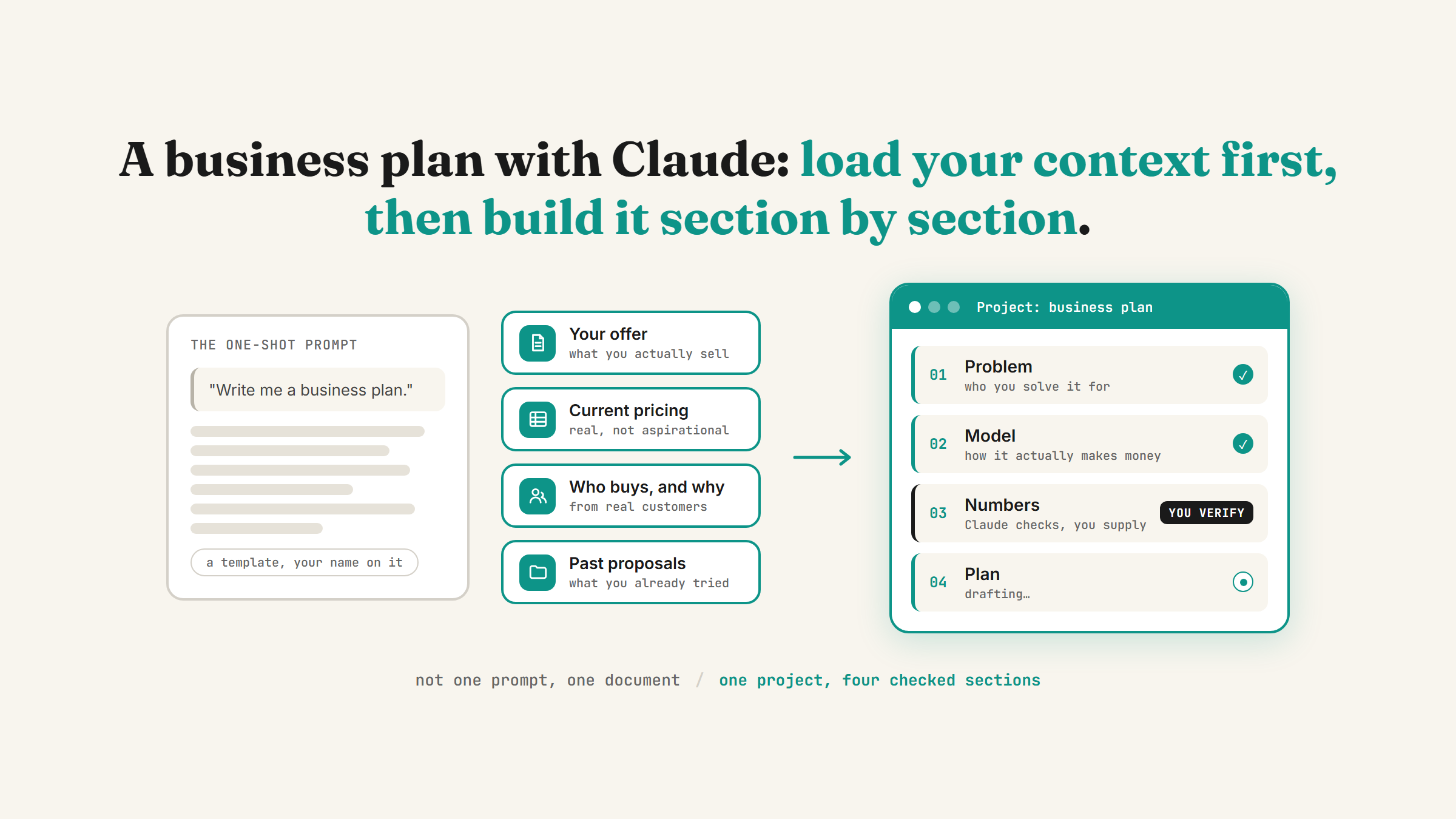
"Write me a business plan" is one of the first things people try in Claude, and it's also one of the worst ways to use it. Type that on its own and you get a competent-looking template: an executive summary, a market section, some generic financial headings, your company name dropped in where it belongs. It reads fine. It also has nothing real in it, because Claude has nothing real to work from. The plan that's actually useful comes from a slower process: load your real context in first, then build the document section by section instead of asking for the whole thing at once.
Why the one-shot prompt fails
Ask for a full business plan in a single message and Claude fills the gaps with plausible-sounding defaults. It doesn't know your actual pricing, your actual customers, or what you've already tried and ruled out, so it invents a version that sounds like a business plan without being yours. The output isn't wrong exactly, it's just generic, and a generic plan is worse than no plan because it feels finished when it isn't.
The fix isn't a cleverer prompt. It's giving Claude something real to work from before you ask it to write anything.
Step 1: Load your context before you ask for a single section
Start a Project and drop your real material into it first: whatever you already have, notes on your offer, current pricing, a rough list of who buys from you and why, past proposals, anything that describes the actual business rather than the idea of one. If you've already got memory turned on and Claude knows your business from other conversations, that helps too, but the project files matter more here because a business plan needs specifics memory alone won't hold.
This step is the one people skip, and it's the one that decides whether the output is usable. Ten minutes gathering what you already know about your own business is worth more than any amount of prompt engineering afterwards.
Step 2: Build it one section at a time, not in one shot
Once the context is loaded, work through the plan the way you'd write it yourself: section by section, checking each one before moving to the next. Start with the section you understand best, usually the problem you solve and who you solve it for, since that's the part you can fact-check yourself on the spot. Then move to the model: how the business actually makes money, not how a textbook says it should.
Doing it this way means you catch a generic-sounding paragraph immediately and push back on it, instead of discovering it buried on page four of a finished document you've stopped reading closely by then.
Step 3: Treat the numbers section differently
This is the part worth being most careful with. Claude can help you structure a financial section, format it clearly, sanity-check that your assumptions are internally consistent, and flag if a number in one section contradicts a number in another. What it can't do is know your actual market size, your actual costs, or what a lender or investor in your specific situation will expect to see. Any figure, growth rate, or market stat that ends up in the numbers section needs to come from you or from a source you've checked yourself, not from Claude filling a gap plausibly.
Step 4: Keep it a living document, not a one-time export
A business plan that gets written once and never opened again wasn't worth writing. Because the plan lives in a Project with your context already loaded, updating it later is a much smaller job than the first draft was, you're not starting over, you're asking Claude to revise one section against context it already has. That's a genuinely different workflow from generating a document, downloading it, and closing the tab.
What this actually looks like when it's done
Put the four steps together and the process looks less like "prompt in, plan out" and more like working with a drafting partner who needs to be handed the real material first: a project with your actual context, a plan built section by section with you checking each one, numbers you've verified yourself, and a document you can keep coming back to rather than filing away. It's slower than one prompt. It's also the difference between a document that sounds like a business plan and one you'd actually hand to a lender, a partner, or your future self.
If gathering your own context is the part you'd rather not do alone, book a strategy call and we'll set the project up together and work through the sections that matter most for where your business actually is.
FAQ
Can Claude actually write a full business plan for me?
It can draft every section, but the useful version needs your real context loaded first, pricing, customers, what you've already tried, not a single one-shot prompt. Without that context, you get a generic template with your company name swapped in rather than a document specific to your business.
Is it safe to trust Claude with my financial projections?
Use it to structure and sanity-check the numbers section, not to generate the actual figures. Claude doesn't know your real costs or market, so any cost, revenue or growth assumption in that section should come from you or a source you've verified, then Claude can check it's internally consistent with the rest of the plan.
Do I need Claude Projects to do this, or does a regular chat work?
A regular chat can work for a single section, but a Project is worth setting up if you're writing the whole plan, because it keeps your context files attached across every section instead of you re-explaining your business each time you open a new conversation.
How is this different from just using a business plan template?
A template gives you the structure but leaves every section blank for you to fill in from scratch. Working through it in Claude with your real context loaded fills that structure in with a first draft grounded in your actual business, which you then edit and verify, rather than starting from a blank page for each section.
Want help turning this into a plan you'd actually use?
Book a strategy call and I'll walk through setting Claude up around your real numbers and context, then work through the sections that matter most for where you are.
Book a strategy call →One working AI system in your inbox, weekly
The Operator's AI: the email edition of everything I publish here, plus the Free AI Bundle the moment you join.
Subscribe free →