AI Automation Without Coding: What a Non-Technical Owner Can Actually Build
"Automation without code" sounds like a watered-down version of the real thing, a builder tool with training wheels. It isn't, not with Claude Cowork. Here's exactly what you can build with plain English and no code, and where that line actually stops.
 By Abi Odedeyi · CodeFreeIQ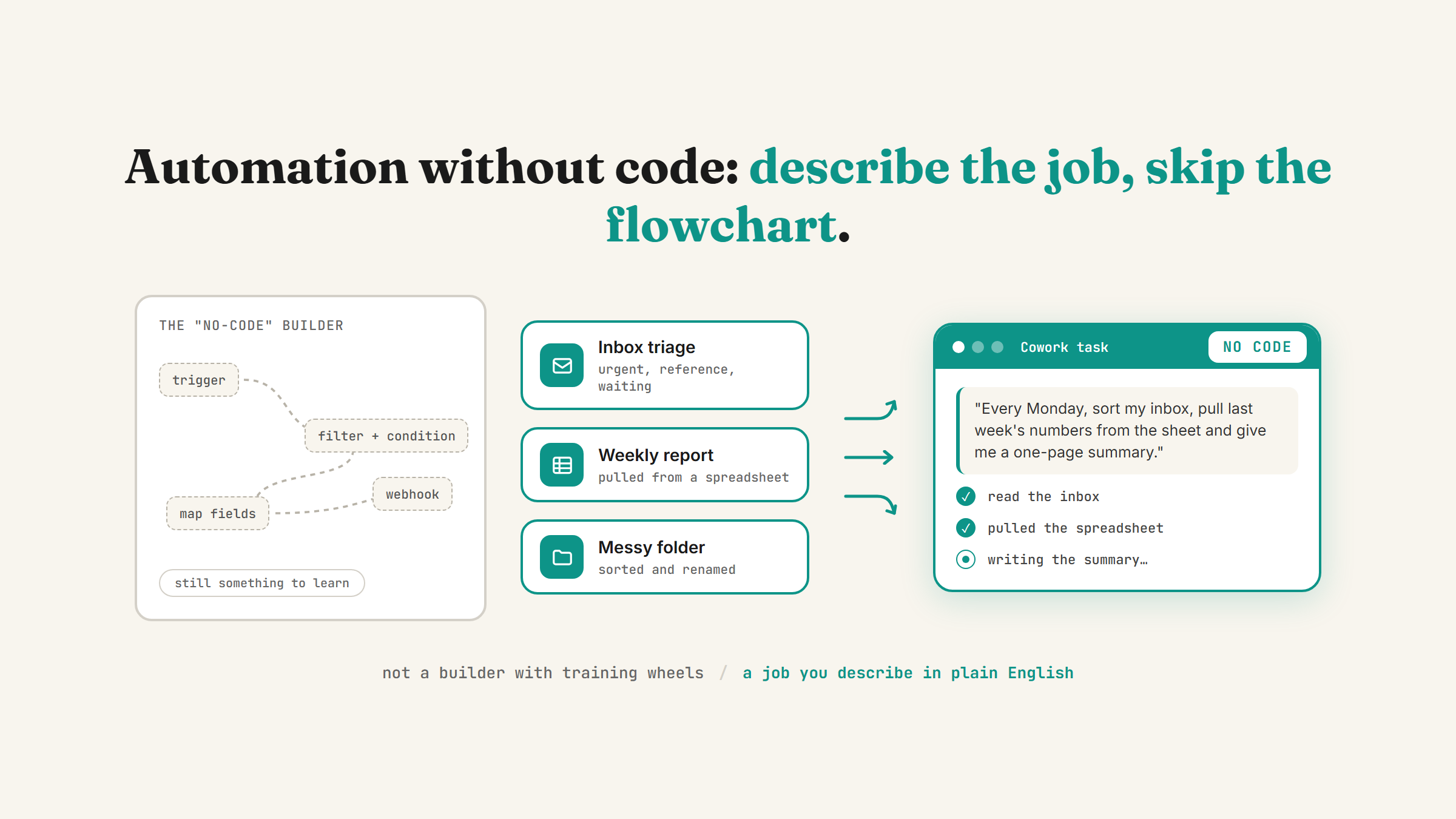
Every "no-code automation" tool I've seen still asks you to learn something: drag a node onto a canvas, wire up a trigger, configure a filter, read a tutorial before you build anything useful. That's not really "no code," it's a different, smaller kind of code with boxes instead of syntax. Claude Cowork is the first version of this I've actually seen skip that step. You describe the task in plain English, point it at your real files and tools, and it does the work. No canvas, no nodes, nothing to configure before you start.
What "no code" actually means here
Cowork is the desktop app version of Claude, the one that reads your actual files, uses your connected tools, and does the work rather than just answering questions about it. I covered the full picture of where Cowork sits between Claude's chat mode and its developer mode in Claude Chat vs Cowork vs Code, but the short version for this post: Cowork is the level built for someone who has never written a line of code and never plans to.
That matters because "no-code" tools built for developers-who-don't-want-to-code and tools built for business owners who have genuinely never touched a script are not the same thing, even when they're marketed the same way. The first kind still expects you to think in triggers, conditions and data mapping. The second kind, which is what Cowork actually is, expects you to describe a task the way you'd explain it to a new hire.
Four things you can genuinely build with zero code
These are the automations that hold up in practice, not demo-day tricks. The first three are jobs you hand to Cowork directly, using tools you've already connected. The fourth happens in an ordinary Claude chat.
- Inbox triage. Point Cowork at a connected Gmail account and describe how you want mail sorted, urgent versus reference versus waiting-on-someone-else. It reads and labels the actual inbox. I wrote about the version of this that runs in my own business in 3 Claude skills that quietly run my business.
- Recurring reports and briefings. A daily summary of your calendar and unread messages, or a weekly report pulled from a spreadsheet, set to run on a schedule so it shows up finished rather than something you have to remember to ask for. The setup for this is entirely
/scheduletyped inside a task, no separate automation platform. Full detail in recurring tasks in Claude Cowork. - File and folder organisation. Point Cowork at a messy folder and describe how you want it sorted or renamed. It reads what's actually there and reorganises it, rather than you writing rules for a script to follow blindly.
- Small internal tools. A budget tracker, an intake form, a simple calculator, built by describing what you want and refined by asking for changes, the same way you'd give feedback to a person. This one uses Claude's Artifacts feature in the chat window rather than Cowork, and I walked through building one from scratch in build a business tool with Claude Artifacts.
None of these need a flowchart, a webhook, or an hour of tutorial before you get anything working. You describe the job, connect the tools it needs, and it runs.
Where the "no code" line actually stops
Being honest about the limit matters more than the pitch. Cowork is genuinely code-free for tasks that fit inside "read some files or tools, do a bounded job, hand back a result." It is not a replacement for custom software, a real integration between two systems that don't already talk to each other, or anything that needs to run reliably at scale with error handling nobody's watching.
If what you actually need is a bespoke tool or a system built from scratch, that's a different level entirely, Claude Code, which is built with developers in mind and does involve getting more hands-on. Most business owners never need to go there. The four categories above cover the overwhelming majority of what actually eats a non-technical owner's week.
How to actually start
Don't try to automate everything at once. Pick the one task you already do the same way, on a predictable cadence, every week, that's the strongest signal it's worth handing off. If you're not sure which task that is, running a free AI time audit of your week is the fastest way to find it rather than guessing.
Once you've picked the task, the order matters: connect the specific tool it needs first (I laid out the full setup sequence in the nine settings that turn Claude into your team), describe the job in one clear sentence, then decide whether it runs on demand or on a schedule. That's the whole process. If you want the fuller version of turning a single task into something that runs on its own with a real job description and a checkpoint, I broke that down in how to hire an AI employee.
The honest test for any of this isn't whether it looks impressive in a demo. It's whether it's still quietly running, correctly, a month from now without you thinking about it. Start with one task, not ten, and let it earn the next one.
FAQ
Can I really automate tasks with Claude without knowing how to code?
Yes, for the categories that fit Cowork: inbox triage, recurring reports, file organisation, and simple internal tools. You describe the task in plain English and point it at your connected tools, there's no flowchart or scripting involved. Genuinely custom software or complex system integrations sit outside that, and need Claude Code or a developer instead.
What's the difference between Claude Cowork and other no-code automation tools?
Most no-code tools still ask you to think in triggers, nodes and conditions, a simpler kind of programming rather than no programming. Cowork works from a plain-English description of the task and your connected tools directly, closer to briefing a person than configuring software.
What should a non-technical business owner automate first?
Whatever task you already do the same way, on a predictable schedule, every single week, that repetition is the signal it's worth automating. If you're not sure which task that is, a free AI time audit will show you where your week actually goes.
Do I need any tools connected before I can automate something with Cowork?
Usually yes, if the task touches email, a calendar, a spreadsheet or another app, that tool needs to be connected first through Claude's connectors, or the task has nothing real to work from. See Claude connectors for Gmail and Calendar for how that setup works.
Want to know what's worth automating first?
Book a strategy call and I'll help you find the one recurring task in your week that's actually worth handing off, then set it up live.
Book a strategy call →One working AI system in your inbox, weekly
The Operator's AI: the email edition of everything I publish here, plus the Free AI Bundle the moment you join.
Subscribe free →