Best AI Assistant for a Small Business Owner: What to Pick and What to Skip
Every list of "best AI assistants" reads like it was written by the tool trying to win. Here's the one question that actually decides it, from someone who sets these up for small teams instead of selling one.
 By Abi Odedeyi · CodeFreeIQ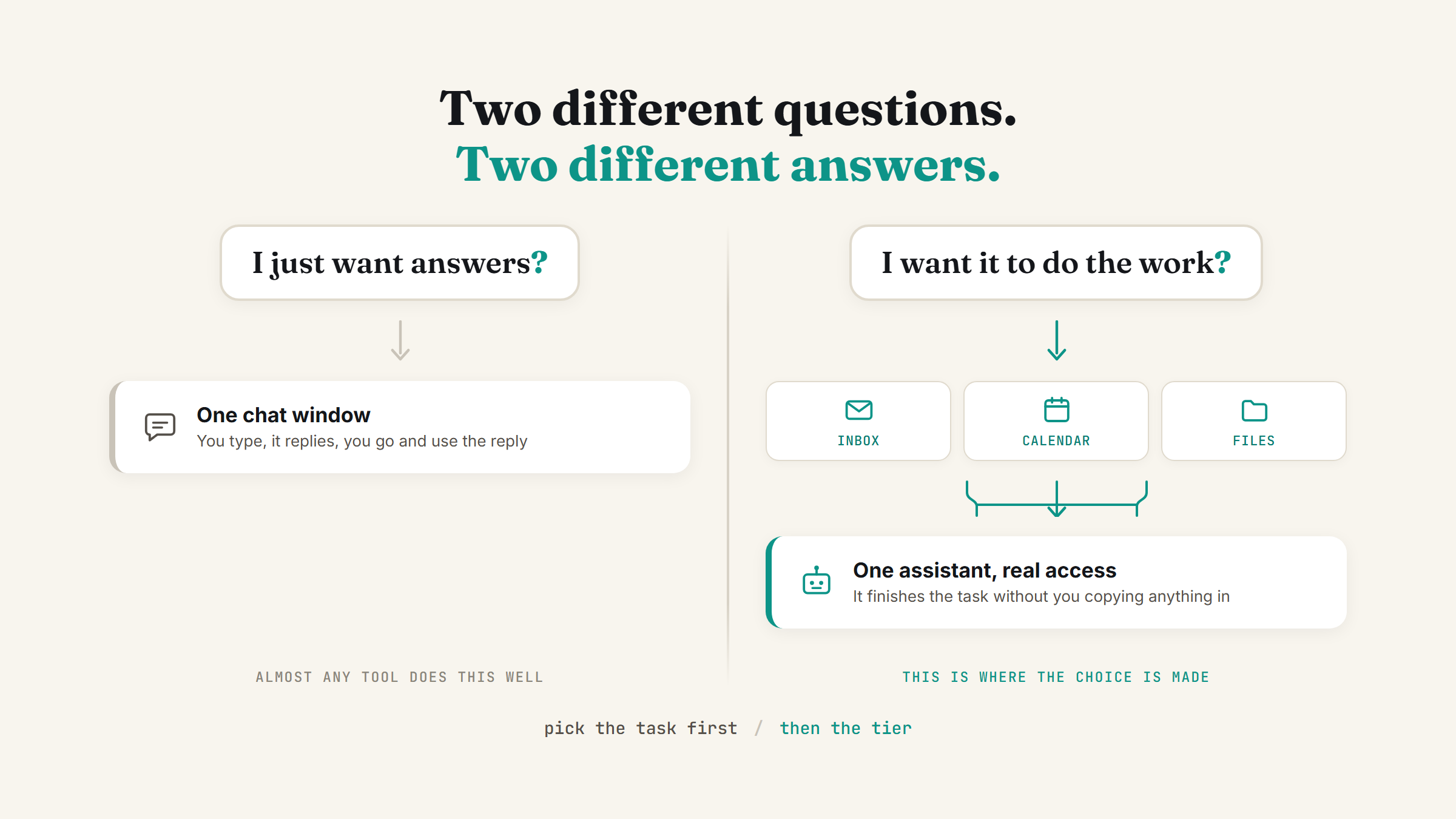
Search "best AI assistant for small business" and every result is a vendor ranking their own product first, followed by a handful of listicles ranking whoever paid for the placement. None of them ask the one question that actually decides this for you, because asking it honestly would rule half their list out. Here's the question, and what it rules out once you answer it.
The question that actually decides this
Do you want an assistant that answers you, or one that does the work? Those are two different products wearing the same marketing language. An assistant that answers you lives in a chat window: you type, it replies, you go do something with the reply. An assistant that does the work reaches into your actual inbox, calendar or files and finishes a task without you copying anything in or out by hand.
Most "best AI assistant" roundups compare the first kind, because that's the kind everyone has tried and everyone can screenshot. If all you need is a smart answer to a question, almost any mainstream option does that well, and I've covered the actual differences between the two most popular ones in Claude vs ChatGPT for business. But if the plan is to hand off real, recurring work, the comparison that matters is a different one entirely.
What "does the work" actually requires
An assistant can't finish a task it can't reach. This is the part the listicles skip. For an assistant to draft a reply from your real inbox, pull your real calendar availability, or read a real file in your Drive, it needs a live connection to those tools, not just a chat window you paste things into. That connection is what turns "I asked it something" into "it did something."
I wrote the full setup for this in Claude connectors: plug Claude into your Gmail and Calendar. Once those connections exist, the same assistant that used to just answer questions can read a real thread and draft a real reply, or check a real calendar before suggesting a time. Nothing about the underlying model changed, what changed is what it's allowed to touch.
Three honest tiers, pick the one you're actually at
Tier one: you want better answers, faster. Drafting, brainstorming, summarising a document someone sent you. Any mainstream chat assistant handles this well. Don't overthink this tier, and don't pay for anything more complex than you need yet.
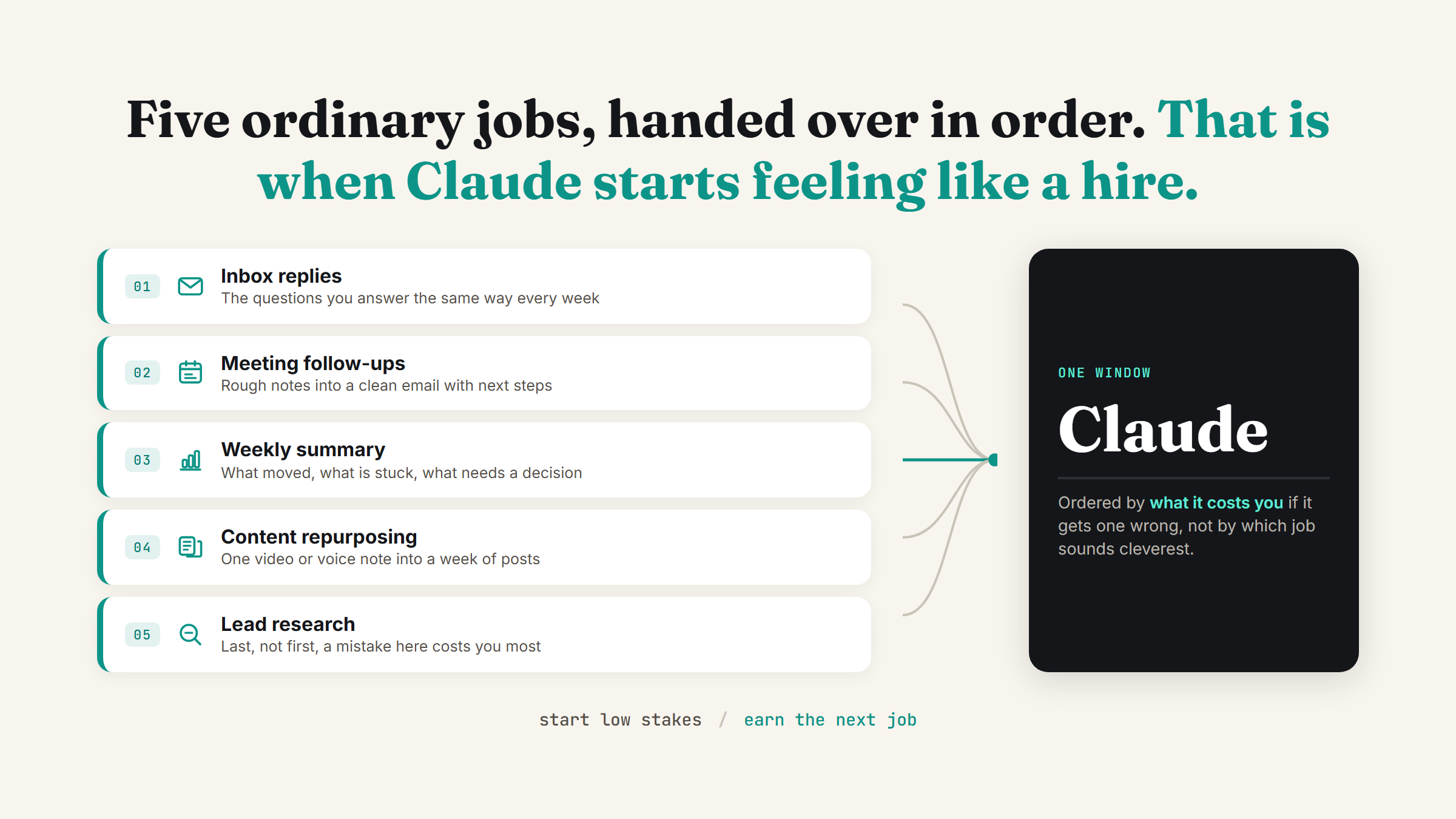
Tier two: you want it to do one recurring job without you starting from scratch. Sorting an inbox, drafting the same type of email every week, pulling a weekly summary from your calendar and files. This is where connectors matter, and where a narrow, well-defined setup beats a general-purpose one. I went into exactly what that looks like in how to hire an AI employee: one job, real tool access, a human checkpoint before anything goes out.
Tier three: you want it running on its own, on a schedule. This is the setup most "AI assistant" marketing is actually describing without saying so plainly: something that starts its own shift instead of waiting for you to open the app. Recurring tasks in Claude Cowork covers how that works in practice, including the part people assume is harder than it is, your laptop being off doesn't stop a scheduled task from running.
Most business owners I work with are somewhere between tier one and tier two when we start, and the biggest mistake is buying tier three before tier two is actually working reliably.
What to skip
Skip anything that asks you to commit before you've named the one job. A platform sold as "your AI assistant for everything" is the same mistake as hiring a generalist with no job description: it sounds efficient and it's the fastest way to end up with something unreliable that nobody trusts enough to actually use.
Skip the pitch that promises it "just knows your business." It doesn't, not out of the box. Any assistant worth using needs you to set up memory, connect the right tools, and tell it what it's actually for. The nine settings that turn Claude into your team is the setup work that has to happen before anything resembling an "AI employee," not after.
Skip paying for capability you can't name a use for yet. If you can't finish the sentence "I want it to stop me from having to ___ every week," you're not ready to pick a tool, you're ready to find the task first.
A fictional example
Picture a five-person bookkeeping firm. The owner started on tier one, using plain chat to draft client emails faster. Once that habit stuck, she connected her inbox and calendar and had the assistant draft replies to routine client questions for her to review before sending, tier two. Six months in, she put the weekly client-status summary on a Monday morning schedule so it's waiting in her inbox before she sits down, tier three. She never bought a platform. She added one connection and one schedule at a time, each only after the previous one was actually working.
Where to start
Don't pick a tool before you've picked the task. If you're not sure what's actually eating your time, a free AI time audit of your week will show you the real number instead of a guess, and that task should decide which tier you're buying into, not the other way around.
FAQ
What's the best AI assistant for a small business owner?
There isn't one universal answer, because "best" depends on whether you want better answers or an assistant that does recurring work inside your real tools. For plain chat, see Claude vs ChatGPT for business. For an assistant that touches your inbox, calendar or files, the deciding factor is whether it connects to those tools at all, not which brand name is on it.
Do I need to connect my email and calendar for an AI assistant to be useful?
Only if you want it doing recurring work rather than just answering questions. A plain chat assistant is genuinely useful without any connections. The moment you want it drafting real replies or checking real availability, it needs a live connection to those tools, there's no way around that requirement.
Is it worth paying for an "AI employee" platform right away?
Usually not. Start with one narrow task on a free or basic plan, confirm it's genuinely saving time, then add tool access and a schedule once that one task is reliable. How to hire an AI employee walks through the four decisions in order, job first, platform last.
How do I know which task to hand to an AI assistant first?
Pick the task you repeat the same way every week with the least judgement involved, inbox triage and recurring status summaries are common starting points because the input and output barely change shape. If you're not sure which task that is for you, a time audit will show you where the hours are actually going.
Picking a tool is the easy part. Setting it up so it actually earns its keep is where most people get stuck, and that's exactly what a strategy call is for.
Not sure which assistant fits your business?
Book a strategy call and I'll look at how you actually work day to day, then tell you honestly what's worth setting up first and what to skip.
Book a strategy call →One working AI system in your inbox, weekly
The Operator's AI: the email edition of everything I publish here, plus the Free AI Bundle the moment you join.
Subscribe free →