How to Build an AI Employee (Step by Step, No Code Needed)
You don't need to code to build an AI employee. You need a folder structure, a short interview with yourself about your own business, and the discipline to install one system at a time instead of four at once. Here's the exact sequence.
 By Abi Odedeyi · CodeFreeIQ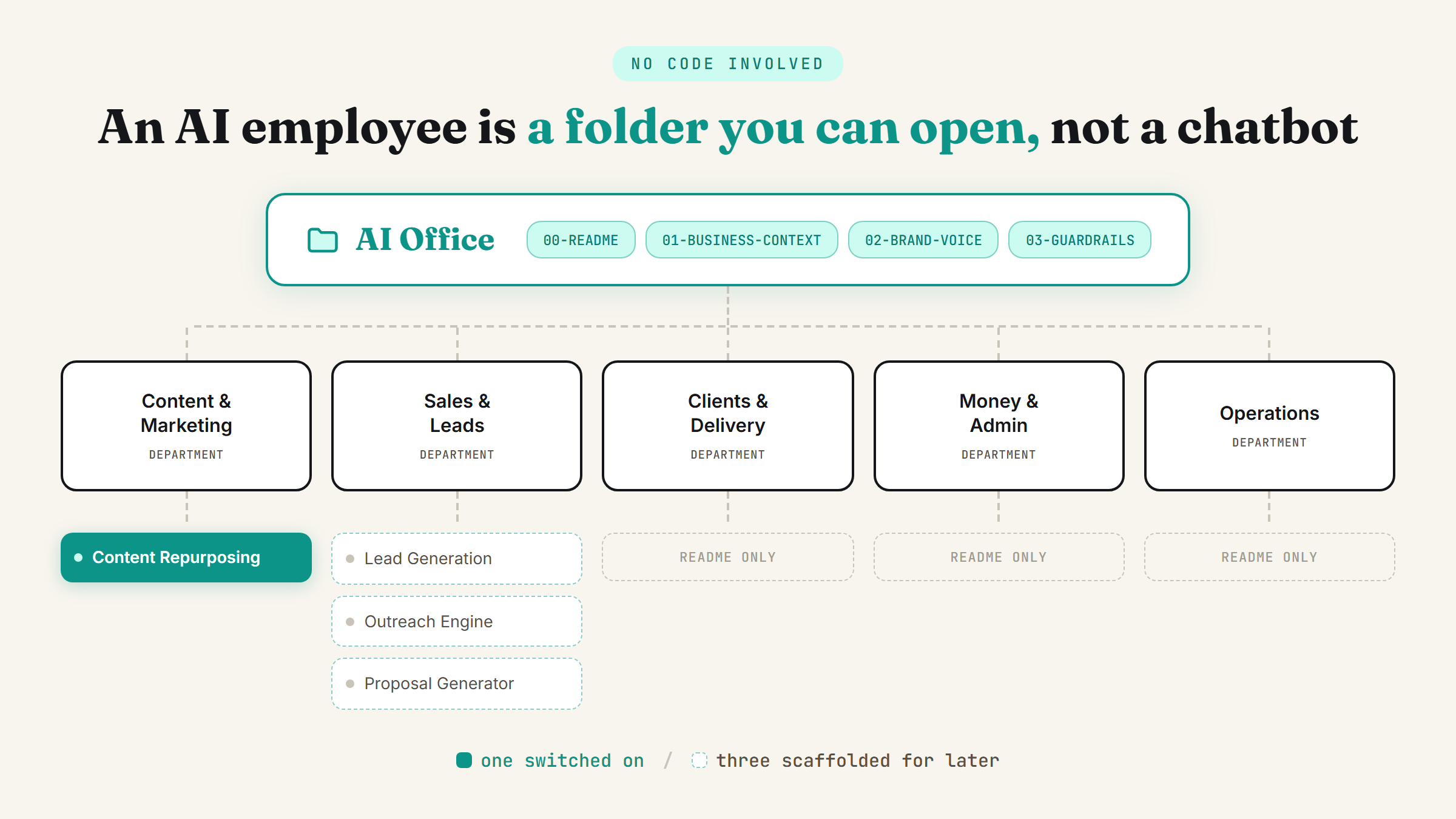
"Build an AI employee" sounds like something that needs a developer. It doesn't. What I actually do, over and over, for non-technical business owners is closer to setting up a filing cabinet than writing code: a folder, a short interview, a few plain-text files, and one working system installed before the next one starts. Here's the sequence, in order.
It's a folder, not a chatbot
The confusion starts with "AI employee" sounding like one all-purpose helper. It isn't. What actually works is a structured setup on your own computer, a home folder with departments inside it, each department holding the specific job it's meant to do, and a written record of what it should never do without asking first. Once that structure exists, "hiring" the next AI employee is adding another department, not starting from scratch.
Step 1: Give it a home you can actually find
Before anything else gets built, it needs a real address. Not a buried system path you'll never navigate to again, your Documents folder or Desktop, somewhere you'd look for any other file. Create one folder there, call it something like "AI Office," and grant it access to that folder specifically, not your whole drive. Then open the folder yourself and confirm you can see it. If you can't find your own AI employee's files, nothing after this step matters.
Step 2: Answer ten questions about your own business
The build starts with an interview, not a template. What does your business sell, who buys it, what tools do you already use, what's a job you'd hand a human assistant on day one, and critically, what should this AI employee never do without checking with you first (sending emails, quoting prices, contacting clients). Real answers, not guesses. A generic AI employee built from a fixed template is why most of these setups don't stick, the useful version is shaped around your actual business, not a category of business.
Step 3: Map departments to what you actually answered
Don't build every department on day one. From those ten answers, a small set of folders should fall out naturally, things like Content & Marketing, Sales & Leads, Clients & Delivery, Money & Admin, Operations, but only the ones your answers actually support. A coach with no invoicing headache doesn't need a Money & Admin department yet. Confirm the list before anything gets built: "here's what I'm setting up, anything missing, anything you'd never use?"
Step 4: Build the routing file and the guardrails first
Every AI Office needs three files before it needs a single system. A short business-context file (what you sell, who buys it, what tools you use), a brand-voice file (built from real examples of how you already write or talk to customers, not invented), and a guardrails file, the explicit list of things it will always ask you about first. On top of those sits one routing file, a plain README that says what lives where and how to ask for work tomorrow morning in one sentence. This is the piece that keeps an AI employee a job description with tools attached, rather than a vague promise nobody can actually use.
Step 5: Install one system at a time, not four
Pick whichever of these matches what you said you wanted more of: leads, content, sales calls, or time back. In my own setups that maps to one of four systems, a content repurposing system, a lead generation system, a personalised outreach system, or a proposal generator, and each one lives inside the department it naturally belongs to. Install the one matching your priority fully, working end to end on real input, before touching the other three. They still get scaffolded with a README each so you know they exist, but only one gets switched on and used.
Step 6: Run the checkpoints before you trust it with anything
Four checks, in order, before you walk away and let it run unattended. First, a voice check: have it draft something short in your voice and tell it plainly whether it sounds like you, correcting the voice file until it does. Second, a live run on one real piece of input, not a hypothetical. Third, confirm the guardrails file actually matches what you said it should never do without asking. Fourth, walk through the routing file yourself so you know exactly how to hand it work the next morning. Skipping straight to "let it run" without these is the fastest way to end up not trusting anything it produces.
The 30-day plan, not a launch day
A working AI Office gets built over a month, not an afternoon. Week one is daily use of the first system with nothing else connected. Week two is connecting your actual tools (email, calendar, whatever you already use) via connectors and turning on the second-priority system. Week three brings in the third system. Week four adds the fourth and a look back at whether it actually saved the hours you hoped for. Three concrete tasks a week, not a wishlist.
Where to start
If you've read this far wondering where to begin, start with the interview, not the folders. Answer the ten questions honestly, including the guardrails one, and the department structure mostly writes itself. Then build and run one system before you think about the other three. That order, interview, one department, one system, checkpoints, is the whole difference between an AI employee that actually runs and a folder full of unused prompts.
FAQ
Do I need to know how to code to build an AI employee?
No. The actual build is a folder structure, a handful of plain-text files (business context, brand voice, guardrails, a routing README), and prompts that already exist for each system. The technical part is Claude reading and writing those files, not you writing any code.
How long does it take to set one up?
The initial build, folder, interview, first system installed and checkpointed, can happen in a single working session. Getting it fully embedded across four systems and multiple departments is closer to a month, following a weekly plan rather than trying to do everything at once.
What should an AI employee never be allowed to do on its own?
Anything customer-facing or irreversible: sending an email, quoting a price, publishing content, contacting a client. That list gets written down explicitly in a guardrails file during setup, and a well-built AI employee checks with you before crossing it, every time, not just the first time.
What's the difference between this and just chatting with Claude?
A chat has no memory of your business between sessions and no fixed job. An AI employee, built this way, has a written business context, a saved brand voice, a specific department it belongs to, and a schedule or trigger that runs it without you re-explaining everything each time. If you haven't set those pieces up yet, the settings that turn Claude into your team is the place to start before attempting a full build.
Ready to build the first one properly instead of guessing at folder names? Book a strategy call and we'll run the interview and build the first working department together.
Want your AI employee built for you, live?
Book a strategy call and I'll walk through the interview with you and build the first working department in the session.
Book a strategy call →One working AI system in your inbox, weekly
The Operator's AI: the email edition of everything I publish here, plus the Free AI Bundle the moment you join.
Subscribe free →