What Claude Cowork Actually Costs a Small Team (and Which Plan to Start On)
"How much does Cowork cost" is the wrong question, because you don't buy it on its own. Here's what each paid Claude plan actually costs as of this week, straight from Anthropic's pricing page, and which one makes sense for a small team before you default to the most expensive option out of nerves.
 By Abi Odedeyi · CodeFreeIQ
"How much does Cowork cost" is the wrong question to start with. Cowork isn't a separate subscription or an add-on toggle, it's the do-the-work mode that comes bundled into whichever paid Claude plan you're already on. So the real question is which Claude plan to pay for, and that depends on how much work you're actually planning to hand it. Here's what each plan costs, checked directly against Anthropic's own pricing page on 2 November 2026, since these numbers do move.
Cowork rides on your Claude plan, it isn't billed separately
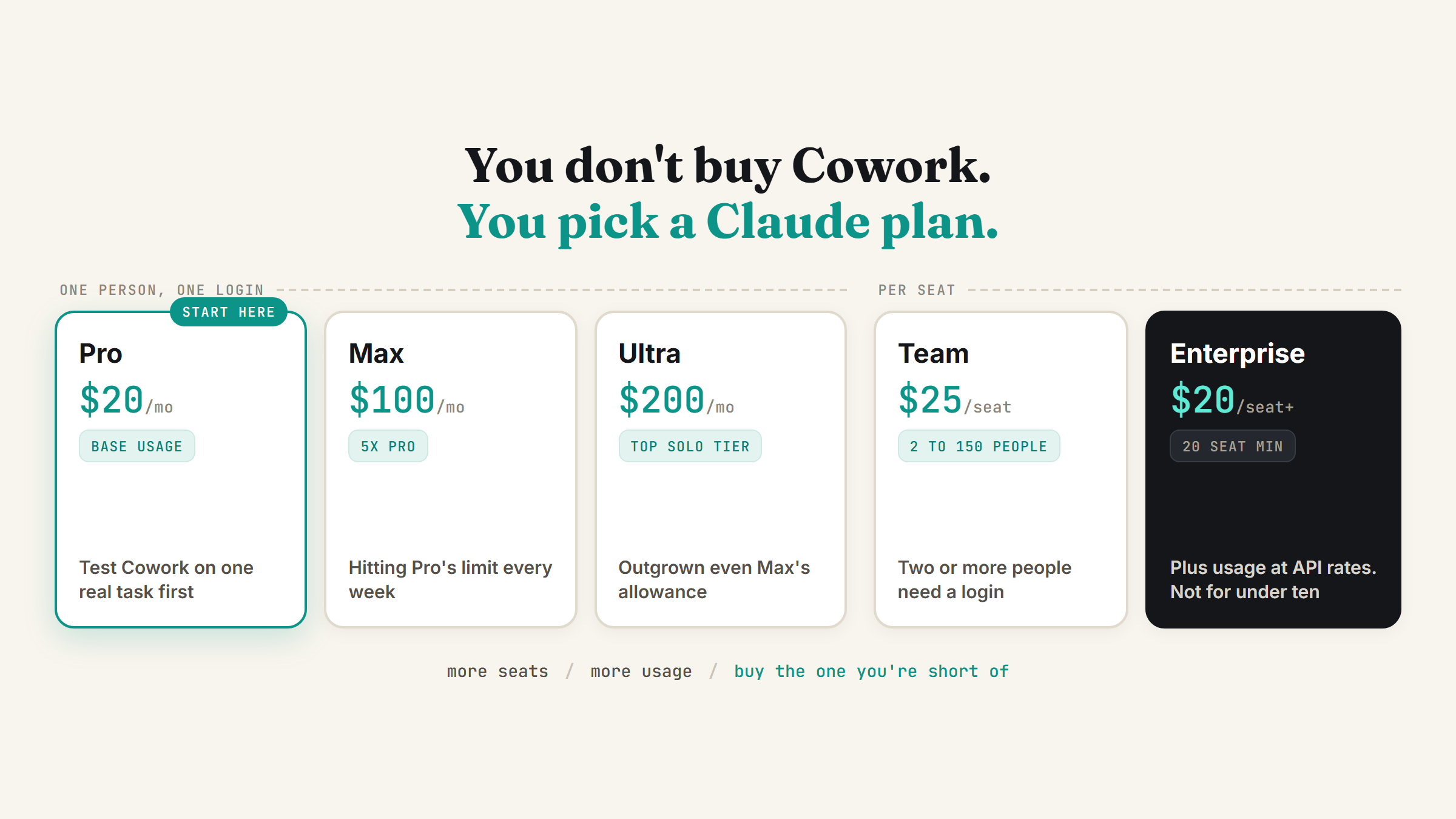
There's no "Cowork" line item on your bill. Anthropic's own help centre says Cowork is available on the paid plans only: Pro, Max, Ultra, Team and Enterprise. The free plan doesn't include it at all. Practically, that means the decision in front of you is "which Claude plan", not "do I also need to buy Cowork."
What each plan actually costs right now
Pro: $20 a month, or $17 a month billed annually ($200 up front). This is the individual plan, one person, one login, and it's the cheapest way in to Cowork.
Max: $100 a month. Still an individual, single-login plan. The difference from Pro is usage: five times Pro's allowance, both in each five-hour window and across the week. Max is billed monthly only, there's no annual discount on it the way there is on Pro and Team.
Ultra: $200 a month. The top individual tier, also monthly only, for people who have outgrown even Max's allowance. If you remember a "Max 20x" plan, this is roughly where it went.
Team Standard: $25 per seat a month, or $20 per seat a month billed annually. This is where it becomes a per-person cost. Team is built for teams of 2 to 150 people.
Team Premium: $125 per seat a month, or $100 per seat a month billed annually. Same team size range as Standard, with five times the usage of a Standard seat for each person on it.
Enterprise: $20 per seat a month billed annually, plus usage billed at API rates, with a 20-seat minimum. The seat price looks low, but the usage on top scales with how much work you hand it, so the real bill isn't something you can read off the page.
Why the usage allowance matters more than the sticker price
Cowork burns through your usage allowance faster than a quick chat question does. Anthropic says it plainly: multi-step work that runs code, creates files, or uses your connected apps or the browser uses more of your usage than a quick question, because every step Claude takes costs something. That's the real reason Max and Ultra exist. They aren't a different product from Pro, they're more runway before you hit a limit. If you're on Pro and Cowork tells you to wait until your limit resets partway through the week, that's the signal to look at Max, not a sign something's broken.
I covered what scheduled tasks actually do once you're set up in recurring tasks in Claude Cowork, worth reading before you decide how much usage headroom you'll actually need, since a task that reruns daily eats into that allowance every time it fires.
Which plan to start on for a small team
If it's just you, start on Pro. Twenty dollars a month is cheap enough to actually test whether Cowork earns its place in your week before you commit to anything bigger. I wrote about what a sensible first task looks like in What Is Claude Cowork?, start there rather than pointing it at your whole business on day one.
If you're hitting usage limits on Pro within the first couple of weeks, move to Max before you assume you need Team. Team's main difference from Max isn't more power, it's seat management and billing for more than one person. A solo owner who's simply running more Cowork tasks than Pro's allowance covers needs more usage, not more seats.
If more than one person on your team needs their own login, that's when Team actually applies. Two seats minimum, and Standard covers most small teams. Premium only earns its extra cost if several people are running Cowork hard enough to need the bigger allowance each.
Enterprise is not a small-team plan. The 20-seat minimum rules most teams under ten out on its own, and the usage-on-top billing tells you it's built for a different scale of buyer.
What this doesn't tell you
Prices change, and this post will be stale at some point after today. If you're reading this more than a few months after 2 November 2026, check claude.com/pricing yourself before deciding anything. If a connector or feature matters more to you than the subscription cost, Claude connectors: plug Claude into your Gmail and Calendar is worth reading too, so you know what you're actually connecting before you pick a tier.
FAQ
Is Claude Cowork a separate subscription from Claude?
No. Cowork is part of the regular paid Claude plans (Pro, Max, Ultra, Team and Enterprise), not something billed on its own. The free plan doesn't include it. What changes between plans is usage allowance and, for Team and Enterprise, per-seat billing for multiple people.
What's the cheapest way to try Claude Cowork?
Pro, at $20 a month or $17 a month billed annually, is the cheapest plan that includes Cowork. It's an individual, single-login plan, which makes it the right way to test a first real task before committing to anything bigger.
Do I need Max instead of Pro?
Only if you're actually hitting Pro's usage limit, usually from running Cowork tasks often enough that Pro's allowance doesn't stretch far enough. If that's happening within your first couple of weeks, Max at $100 a month, with five times Pro's usage, is the next step up, not Team.
How many seats do I need on Team?
Team plans require a minimum of two seats, so it only makes sense once at least two people need their own separate login. A single owner running more usage than Pro allows should look at Max first, since seats aren't the thing solving a usage problem.
Not sure which plan your team actually needs?
Book a strategy call and I'll look at what you're actually asking Claude to do, then tell you honestly whether Pro covers it or you're genuinely into Max or Team territory.
Book a strategy call →One working AI system in your inbox, weekly
The Operator's AI: the email edition of everything I publish here, plus the Free AI Bundle the moment you join.
Subscribe free →